Ambience Tool
A downloadable tool for Windows
Ambience Tool
Create your perfect background ambience — mix rain, fire, waves, and music your way.
NOTE: WINDOWS ONLY CURRENTLY SUPPORTED
🎧 What it does
The purpose of this tool is to be a utility in helping you stack multiple audios, which will be continuously looped. Perfect for ambience sound stacking. Each sound gets a slider, that allows you to manipulate its volume until you have a fitting ambience to enjoy!
Why? I wanted an app that can help keep my mind at ease by focusing on the beautiful sounds of crashing waves, storming weather, and a sooth fire-crackle to tip the cherry off the top of the cake! I use it when playing games, and when typing up documents. It is also helpful for coding haha!
🛠️ Highlights:
-
Unlimited audio files: Scales in RAM according to file sizes. Simply drag & drop audio files into the sounds folder and reload the app to load them.
-
Playlist support:
*.m3ufiles allow you to define the order of audio sliders in the app. Theplaylist.m3ufile is loaded by default on app startup. -
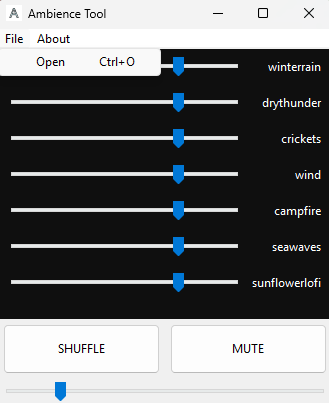
Dynamic audio sliders: Native window look and feel for smooth, responsive control.
-
Quick controls: Shuffle and Mute buttons for easy track management.
-
Master volume: Adjust overall app volume with a single slider.
-
Compact and lightweight: Minimalistic, simple design.
-
Customizable ambience: Audio from the sounds folder is automatically loaded, and can be further personalized using
*.m3uplaylists. -
Flexible playlist loading: Open any
*.m3ufile at runtime, and the app will automatically load all audio files listed in it, regardless of their location on your PC.
✅ How to use:
-
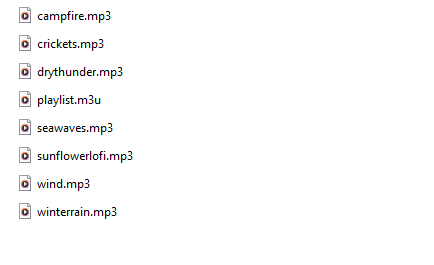
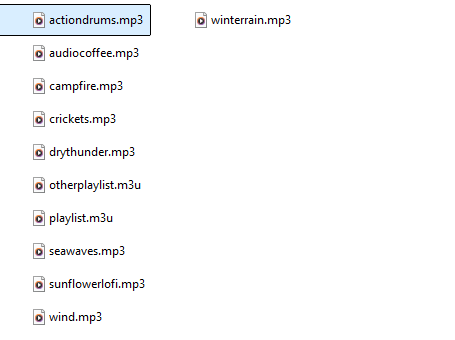
Sounds folder:
The sounds folder is the base folder from which the app launches and loads audio files by default. -
Adding audio files:
Add your audio files (.wav,.mp3,.ogg) to the sounds folder. -
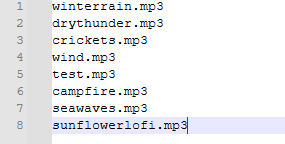
Playlists:
You can create aplaylist.m3u(or any*.m3u) file to specify the order of your audio files, or which audio files to load on app launch.New feature: You can now load any
.m3ufile from anywhere on your PC. The app will load the audio files as specified in that playlist, regardless of their location. -
Loading files:
Restart the app, or open a.m3ufile to load new audio files or an updated playlist. -
Volume controls:
-
Each track has its own slider (default 75% volume).
-
Click SHUFFLE to randomly reorder sliders.
-
Click MUTE/UNMUTE to toggle individual tracks.
-
Adjust MASTER VOLUME to control overall volume from 0 to 100%.
-
Sounds folder example:
playlist.m3u file example:
app loaded playlist.m3u example:
Made as a simple tool to help me with my OCD — now available to those who might find it useful too ❤️
Purchase
In order to download this tool you must purchase it at or above the minimum price of $3 USD. You will get access to the following files:
Development log
- 🌿 Minor Update v.1.2 — Master Volume SliderNov 09, 2025
- 🌿 Update v.1.1 — Custom Playlists & New Menubar!Nov 09, 2025
Leave a comment
Log in with itch.io to leave a comment.